
Native SDK - iOS Integration Guide
Prerequisites
Before starting iOS integration, make sure you have completed the preparation process and server-side integration in the Embedded SDK overview.
Integration Summary
Native SDK for iOS is designed for merchants that want to present PingPong Checkout as a bottom-sheet payment experience inside their own iOS app. Your server creates the payment session through prePay, and the iOS client uses the returned token to launch the checkout.
For App Store submission, privacy declarations, and review guidance, refer to App Submission & Compliance.
Payment Experience
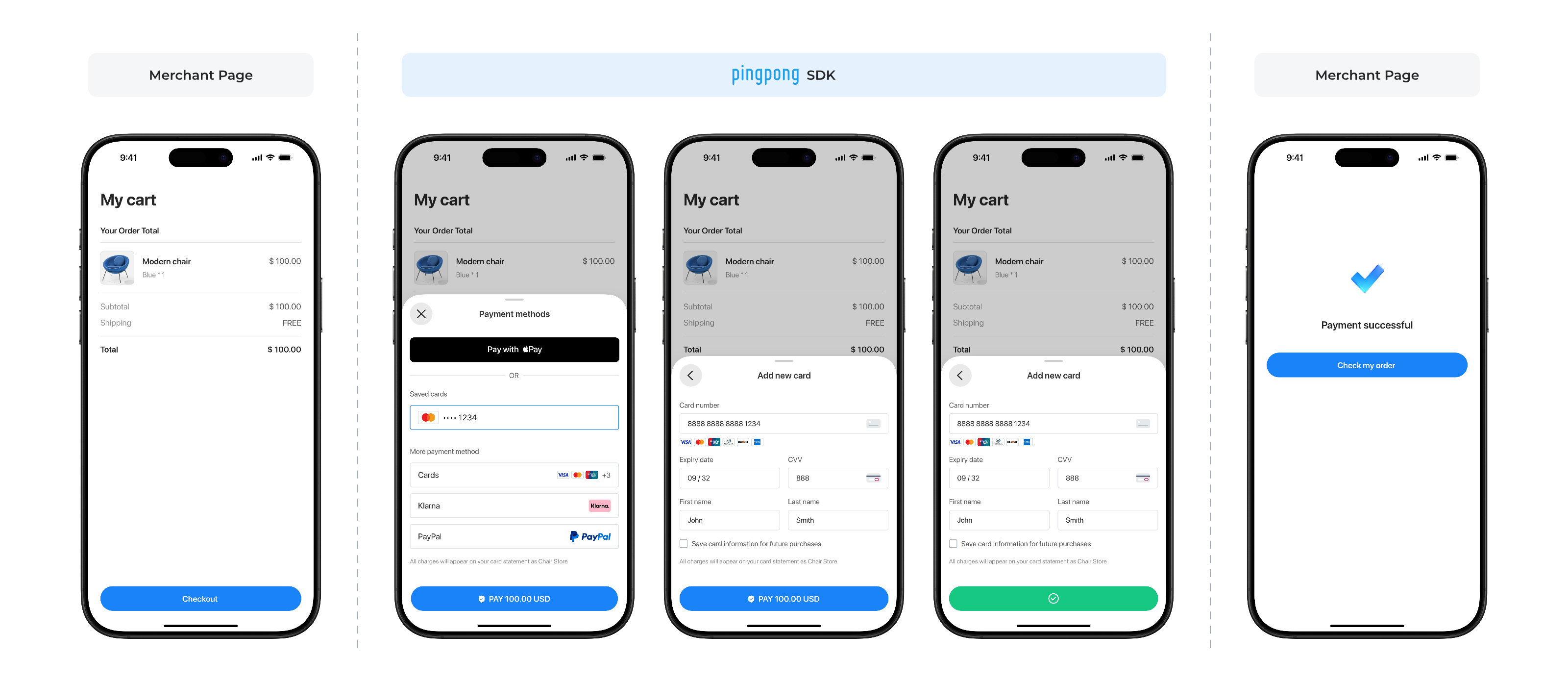
Environment Requirements
| Item | Requirement |
|---|---|
| iOS Version | 15.6+ |
Import Instructions
Manual Integration
- Download the SDK's
.frameworkandPPCashDeskSDKBundle.bundleresource files - Drag both files into your project path
Dependencies
Ensure the following dependencies are included in your Podfile:
| Dependency | Version | Description |
|---|---|---|
| AFNetworking | 4.x | Network requests |
| SDWebImage | 5.x | Image loading and caching |
| MJExtension | 3.x | JSON and model conversion |
| MJRefresh | 3.x | Pull-to-refresh and infinite scroll |
| Masonry | 1.x | Auto layout |
| MBProgressHUD | 1.x | Loading indicators |
| Bugly | - | Error monitoring |
Payment Flow
SDK Configuration and Key Objects
Key Objects Description
| Class Name | Description |
|---|---|
| PPCDManager | SDK main entry class, singleton pattern |
| PPCDConfig | SDK configuration class |
| PPPaymentRequest | Payment request parameters |
| PPPaymentResult | Payment result callback |
Environment Configuration
Environment Enumeration:
typedef NS_ENUM(NSInteger, PPCDEnvironmentType) {
    PPCDEnvironmentTypeRelease = 1,    // Production Europe
    PPCDEnvironmentTypeSandBox = 4,    // Sandbox
    PPCDEnvironmentTypeReleaseUS = 6   // Production US
};| Enumeration Value | Value | Description | API Endpoint |
|---|---|---|---|
| PPCDEnvironmentTypeSandBox | 4 | Sandbox Environment | https://sandbox-acquirer-payment.pingpongx.com |
| PPCDEnvironmentTypeRelease | 1 | Production Environment - Europe | https://acquirer-payment.pingpongx.com |
| PPCDEnvironmentTypeReleaseUS | 6 | Production Environment - US | https://acquirer-payment-checkout-us.pingpongx.com |
Configuration Example:
PPCDConfig *config = [[PPCDConfig alloc] init];
config.environmentType = PPCDEnvironmentTypeSandBox;    // Sandbox
// config.environmentType = PPCDEnvironmentTypeRelease;    // Production Europe
// config.environmentType = PPCDEnvironmentTypeReleaseUS;  // Production US
Key Integration Steps
Step 1: Initialize SDK
#import <PPCashDeskSDK/PPCashDeskSDK.h>

// Get SDK instance
PPCDManager *manager = [PPCDManager sharedInstance];

// Configure SDK
PPCDConfig *config = [[PPCDConfig alloc] init];
config.environmentType = PPCDEnvironmentTypeRelease;    // Set network environment
config.shouldStartRecLog = YES;                         // Enable logging
config.cardBinLengthValue = 11;                         // Set card BIN digit length
config.applePayMerchantId = @"";                        // Set ApplePay MerchantId, requires user to apply and configure

manager.config = config;
Configuration Parameters Description:
| Parameter | Type | Description |
|---|---|---|
| environmentType | enum | PPCDEnvironmentTypeSandBox / PPCDEnvironmentTypeRelease |
| shouldStartRecLog | BOOL | Enable logging |
| cardBinLengthValue | int | Set card BIN digit length |
| applePayMerchantId | String | Set ApplePay MerchantId, requires user to apply and configure |
Step 2: Launch Checkout
[manager initWithToken:@"your_token"
             completed:^(NSString *code) {
    // Payment information submitted successfully. This does NOT indicate payment success.
    // Verify final status via server-side confirmation.
}
             failure:^(NSError *error) {
    // Payment flow failed or was interrupted.
    // Always verify final status via server-side confirmation.
}
             cancel:^{
    // User canceled
}];
Apple Pay Configuration
Configure Developer Account
Create Merchant Identifier:
- Log in to Apple Developer Center, select "Merchant IDs"
- Enter a unique identifier (format:
merchant.com.{app_name})
Generate Payment Processing Certificate:
- In Developer Center, select the corresponding merchant identifier, click "Create Certificate"
- Download CSR file (generated via Xcode or terminal), upload to obtain
.cercertificate file
Pass Merchant ID:
PPCDConfig *config = [[PPCDConfig alloc] init];
config.applePayMerchantId = @"merchant.com.yourapp";
manager.config = config;