
Native SDK - Android Integration Guide
Prerequisites
Before starting Android integration, make sure you have completed the preparation process and server-side integration in the Embedded SDK overview.
Integration Summary
Native SDK for Android is designed for merchants that want to present PingPong Checkout as a bottom-sheet payment experience inside their own Android app. Your server creates the payment session through prePay, and the Android client uses the returned token to launch the checkout.
For Google Play submission, privacy declarations, and review guidance, refer to App Submission & Compliance.
Payment Experience
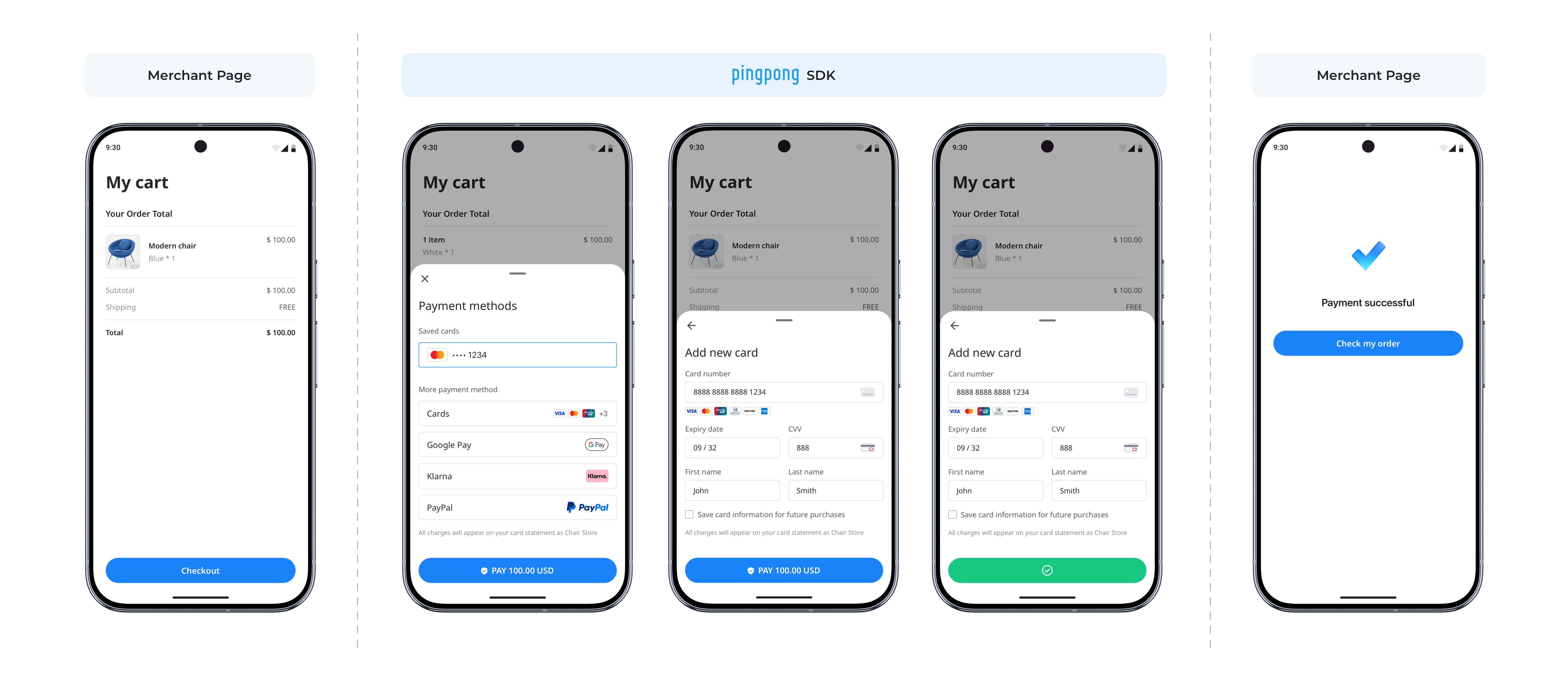
Environment Requirements
| Item | Requirement |
|---|---|
| Android Gradle Plugin (AGP) | 8.13.2 |
| Java | 17 |
| Android SDK | compileSdk 36, targetSdk 36, minSdk 24 |
| OkHttp | 4.12.0 |
| Gson | 2.11.0 |
| Retrofit | 2.11.0 |
Import Instructions
Manual Integration
Download the Android SDK AAR file.
Please contact PingPong technical support to obtain the download URL.
Import dependency into Android Studio project.
Copy the aar file to the module's libs directory, add dependency in module's gradle file:
dependencies {
    implementation files('libs/payment-android-sdk-1.0.0.aar')
}
Payment Flow
SDK Configuration and Key Objects
Key Objects Description
| Class Name | Description |
|---|---|
| PPPayment | SDK main entry class |
| PaymentConfig | SDK configuration class |
| PaymentResult | Payment result callback (Sealed Class) |
| Environment | Environment enumeration (SANDBOX/ONLINE/ONLINE_US) |
Environment Configuration
Environment Enumeration:
enum class Environment {
    SANDBOX,     // Sandbox environment
    ONLINE,      // Production environment - Europe
    ONLINE_US    // Production environment - US
}| Enumeration Value | Description | API Endpoint |
|---|---|---|
| SANDBOX | Sandbox Environment | https://sandbox-acquirer-payment.pingpongx.com |
| ONLINE | Production Environment - Europe | https://acquirer-payment.pingpongx.com |
| ONLINE_US | Production Environment - US | https://acquirer-payment-checkout-us.pingpongx.com |
Cross-Platform Mapping:
| Android | iOS Equivalent | Description |
|---|---|---|
SANDBOX | PPCDEnvironmentTypeSandBox | Sandbox environment |
ONLINE | PPCDEnvironmentTypeRelease | Production Europe |
ONLINE_US | PPCDEnvironmentTypeReleaseUS | Production US |
Configuration Example:
val config = PaymentConfig(
    environment = Environment.SANDBOX,    // Sandbox
    // environment = Environment.ONLINE,  // Production Europe
    // environment = Environment.ONLINE_US  // Production US
    logEnabled = true,
    cardBinLength = true
)
Key Integration Steps
Step 1: Initialize SDK
val config = PaymentConfig(
    environment = Environment.SANDBOX, // Control environment switch
    logEnabled = true, // Enable/disable SDK logging
    cardBinLength = true // Set card BIN digit length
)
Step 2: Launch Checkout
// 1. Create payment instance
val payment = PPPayment(activity, PaymentResultCallback { result ->
    when (result) {
        is PaymentResult.Completed -> {
            // Payment information submitted successfully. This does NOT indicate payment success.
            // Verify final status via server-side confirmation.
        }
        is PaymentResult.Canceled -> {
            // User canceled
        }
        is PaymentResult.Failed -> {
            // Payment flow failed or was interrupted.
            // Always verify final status via server-side confirmation.
        }
    }
})

// 2. Launch the checkout
payment.presentPayment(
    token = "your_token",
    config = config
)