
GMC Serial Port MIS Integration
Overview
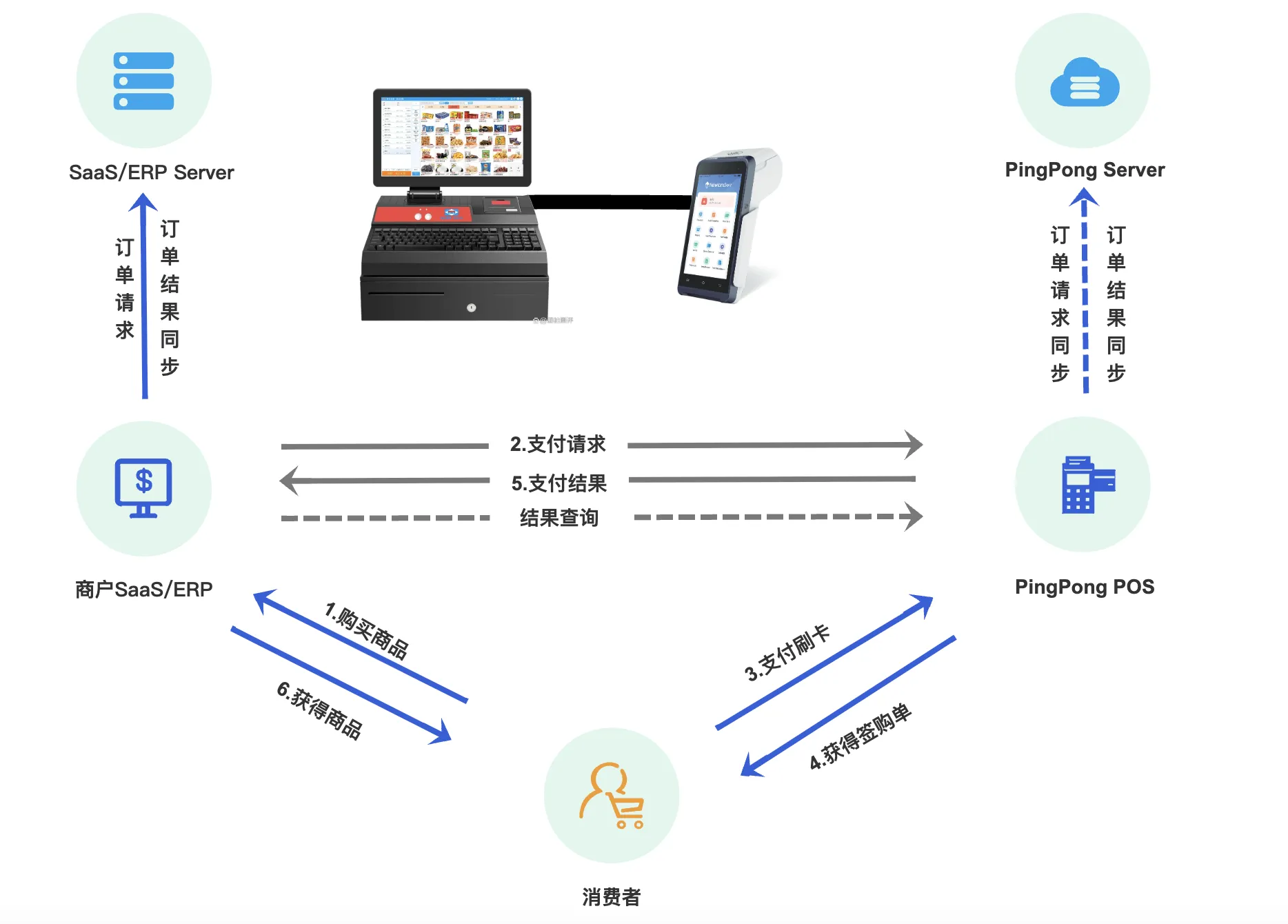
The GMC serial port MIS integration solution provides an efficient payment integration method for SAAS cash register manufacturers, directly communicating with POS devices through serial ports to complete payment transactions without network connection.
Application Scenarios
- Offline retail cash register systems
- SAAS cash register manufacturers
- POS device integration
- Offline/semi-offline payment scenarios
Core Functions
Supported Features
- Order Payment - Create orders and complete payments
- Transaction Refund - Refund completed transactions
- Transaction Query - Query transaction status and details
- Heartbeat Detection - Maintain device connection status
- Reprint - Reprint transaction receipts
- Settlement - Batch settlement function
Prerequisites
Before starting the integration, please ensure the following conditions are met:
POS Device Requirements
- POS device has integrated GMC serial communication protocol
- Supports standard serial communication (RS-232/USB to serial)
Technical Capability Requirements
- SAAS system has serial communication capability
- Supports serial libraries for Java/Python/C++ and other languages
- Has SHA256 signature implementation capability, see Signature Specification
Merchant Qualifications
- Have obtained merchant's
accIdandclientIdin the PingPong system - Have completed merchant onboarding process
- Have obtained merchant's
Important Notes
Please properly safeguard merchant credential information to avoid security risks caused by leaks.
Serial Communication Protocol
Communication Parameter Configuration
Serial communication requires consistent parameter configuration agreed upon with the POS device:
| Parameter | Default Value | Description |
|---|---|---|
| Baud Rate | 115200 | Communication speed |
| Data Bits | 8 | Number of data bits |
| Stop Bits | 1 | Number of stop bits (1=1 bit, 2=2 bits) |
| Parity | 0 | Parity type (0=None, 1=Odd, 2=Even) |
Message Frame Structure
Serial communication adopts a custom frame structure with the following format:
[Frame Header(2B)] + [Data Length(2B)] + [Data Message] + [Checksum(1B)] + [Frame Tail(2B)]| Field Name | Length(Bytes) | Value Rules |
|---|---|---|
| Frame Header | 2 | Fixed as 0xAA 0x55 |
| Data Length | 2 | 0~65535, indicates number of bytes in data message, stored in big-endian mode |
| Data Message | 0~65535 | Upper layer business data JSON string |
| Checksum | 1 | XOR result of all bytes in data message |
| Frame Tail | 2 | Fixed as 0x55 0xAA |
Message Examples
Here is a hexadecimal serial message example for refund request:
AA 55 01 A4 7B 22 61 63 63 49 64 22 3A 22 31 30 30 30 30 31 22 ... 33 55 AAParsed JSON data:
{
  "accId": "100001",
  "clientId": "POS_12345",
  "event": "REFUND",
  "signType": "SHA256",
  "version": "1.0",
  "requestTime": "1760754805426",
  "sign": "BAEA4D56D885D6BD449BFFA2D9F117ECEDA662C85197A19050CA0C18CC64B871",
  "bizContent": "{...}"
}
Tip
📌 The sign field is the request signature, calculation rules see Signature Specification
Frame Construction Tips
- First convert JSON data to UTF-8 byte array
- Calculate byte array length, convert to 2-byte big-endian format
- Calculate XOR value of all data bytes as checksum
- Concatenate complete message in frame structure order
Interaction Flow
Payment Process Steps
SAAS initiates payment request
SAAS cash register system sends payment request to POS device via serial port, request message needs to use SHA256 signature to ensure data security (Signature Specification).
API call: GMC Serial Payment Interface
POS message processing
POS device receives serial data, parses message and verifies signature, extracts business parameters.
POS forwards payment request
POS device forwards payment request to PingPong server for processing.
PingPong processes payment request
PingPong server validates merchant information, processes payment routing, executes risk control checks.
POS executes transaction
POS device performs swipe, insert or scan transactions according to PingPong server instructions.
POS reports payment result
After transaction completion, POS device reports payment result to PingPong server.
SAAS queries payment result
SAAS cash register system queries payment result from POS device via serial port to obtain transaction status and details.
API call: GMC Serial Query Interface
Refund Process Steps
SAAS initiates refund request
SAAS cash register system sends refund request to POS device via serial port, needs to provide original payment order number and refund amount.
API call: GMC Serial Refund Interface
POS message processing
POS device receives serial data, parses message and verifies signature, validates refund parameters.
POS forwards refund request
POS device forwards refund request to PingPong server for processing.
PingPong processes refund request
PingPong server validates original order information, checks refundable amount, executes refund processing.
POS executes refund
POS device performs refund operation according to PingPong server instructions.
POS reports refund result
After refund completion, POS device reports refund result to PingPong server.
SAAS queries refund result
SAAS cash register system queries refund result from POS device via serial port to confirm refund status.
API call: GMC Serial Query Interface
Related Interfaces
| Interface Name | EVENT | Description | Link |
|---|---|---|---|
| GMC Serial Heartbeat Interface | HEARTBEAT | Maintain SAAS and POS device connection status | View Documentation |
| GMC Serial Payment Interface | PAY | Create payment order and complete transaction | View Documentation |
| GMC Serial Pay Query Interface | PAY_QUERY | Query payment transaction status and details | View Documentation |
| GMC Serial Refund Interface | REFUND | Initiate refund for completed transactions | View Documentation |
| GMC Serial Refund Query Interface | REFUND_QUERY | Query refund transaction status and details | View Documentation |
| GMC Serial Transaction Cancel Interface | TRANSACTION_CANCEL | Cancel transactions in progress | View Documentation |
| GMC Serial Reprint Interface | REPRINT | Reprint transaction receipt vouchers | View Documentation |
| GMC Serial Settlement Interface | CALCULATE | Trigger POS device batch settlement | View Documentation |
Interface Usage Instructions
Heartbeat Detection (HEARTBEAT)
- Recommend sending heartbeat packet every 30 seconds
- Continuous 3 no-response can determine device offline
bizContentfield can be empty
Pay Query (PAY_QUERY)
- Used to query payment transaction status and details
- Supports querying by
merchantTransactionIdortransactionId, choose one of the two - Returns transaction amount, status, time and card payment information details
Refund Query (REFUND_QUERY)
- Used to query refund transaction status and details
- Supports querying by
merchantRefundIdortransactionRefundId, choose one of the two - Returns refund amount, status, time and card payment information details
Transaction Cancel (TRANSACTION_CANCEL)
- Used to cancel transactions in progress
- Requires
merchantTransactionIdmerchant transaction ID - Only effective for transactions in specific states
Reprint (REPRINT)
- Used to reprint previous transaction receipt
bizContentfield can be empty, defaults to print last transaction- If specifying transaction, pass transaction ID in
bizContent
Settlement (CALCULATE)
- Used to trigger POS device batch settlement, usually executed at end of day
bizContentfield can be empty- After settlement completion, POS device will print settlement voucher